Geometric representations
Different representations of geometric objects will lead to different algorithms. Currently, Parry relies a lot on convex shapes described by a support mapping. However, working exclusively with convex shapes is too restrictive so Parry provides composite shapes that allows the construction of a concave shape from its convex parts.
Geometric primitives supported by Parry are defined on the shape
module. They all share a common dynamic
representation. Note that all geometric
primitives have a predefined constant local frame equal to the identity matrix.
Thus, one usually has to store a transformation matrix separately from
the shape itself in order to reach any location and orientation.
Support mappings#
Parry supports generic algorithms that work for any (possibly user-defined) shape defined by a support map. The support map (argument) of a shape is a function that returns the point that maximises its dot product with a given direction . Such a point point is called a support point:
This can be seen as a function that returns a point of the support mapped shape which is the furthest on the given direction. Such a function is enough to describe completely a convex object. If several points are eligible to be support points for a given direction , any one of them can be returned (preferably a corner). The following shows support points for the shapes and , given two directions and :
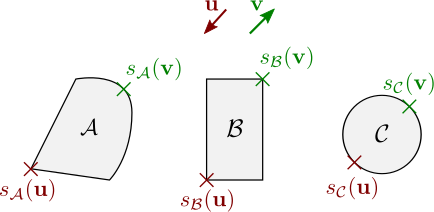
The support mapping function is exposed by the SupportMap trait.
| Method | Description |
|---|---|
.support_point(m, v) | Computes the support point (in the direction v) of the caller transformed by the transformation matrix m. |
.support_point_toward(m, v) | Same as .support_point(...) except that v is already a unit vector. |
Most basic geometric primitives like balls, cubes, cones, can be described by their support mappings. This allows a useful level of genericity for several geometric queries on Parry.
Ball#
The Ball designs a disk in 2D, or a sphere in 3D, both centered at the origin.
| Method | Description |
|---|---|
.radius() | The radius of the ball. |


Cuboid#
The Cuboid structure describes a rectangle in two dimensions or a cuboid in
three dimensions. A cuboid is defined by its half extents, i.e., its
half length along each coordinate axis.
| Method | Description |
|---|---|
.half_extents() | The half extents of the cuboid. |
- Example 2D
- Example 3D


Cylinder#
The Cylinder structure describes a 3D cylinder with as its principal axis.
| Method | Description |
|---|---|
.half_height() | The half height of the cylinder. |
.radius() | The radius of the cylinder basis. |

Cone#
The Cone structure describes a cone of revolution in three dimensions.
A cone is defined by the radius of its basis and its half height − the
half distance between the basis and the apex. It points upward, its principal
axis is the axis, and its apex has coordinates (0, cone.half_height(), 0).
| Method | Description |
|---|---|
.half_height() | The half height of the cone. |
.radius() | The radius of the cone basis. |

Capsule#
The Capsule structure describes either a rectangle with extremitis replaced by half-discs (in 2D),
or a cylinder with extremities replaced by half-balls (in 3D). A capsule is defined by the half height
of its rectangular/cylindrical part and the radius of its extremities. It is centered at the origin and
its principal axis is the axis.
| Method | Description |
|---|---|
.half_height() | The half height of the capsule cylindrical part. |
.radius() | The radius of the capsule extremities. |


Convex hull#
The ConvexPolygon (in 2D) and ConvexHull (in 3D) structures represent the smallest convex envelope of a set of
point. Remember that an object is said to be convex if it is not self-crossing,
and if it contains any segment joining two of its points:
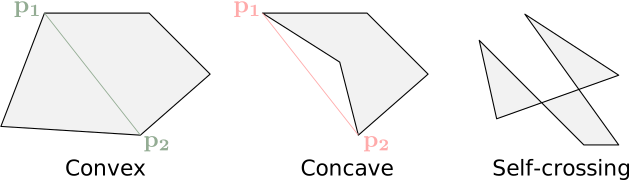
The ConvexPolygon (in 2D) and ConvexHull shape (in 3D) are created from a set of points using the ::try_from_points(points) constructor. Note that this explicitly computes the convex hull of the input point cloud. If you already computed the convex hull on your side, you may use ::try_new(...) instead (described later in this section).
| Method | Description |
|---|---|
.points() | The points used to create the ConvexHull shape. |
- Example 2D
- Example 3D
If you have the ability to provide the convex hull directly, you may use ::try_new(...) instead. It won't compute explicitly the convex hull of the points but expect the input to describe one. In 2D, the given vertices are expected to be ordered such that they appear counterclockwise on the convex polygon boundary. In 3D, the provided index buffer must be such that each triangle is properly connected to its neighbors and is oriented counterclockwise, i.e., given a triangle ABC, the cross product should result in a vector pointing toward the exterior of the convex polyhedron.
- Example 2D
- Example 3D
Keep in mind that while those constructors will fail if the topology of the convex hull is invalid, or if it contains degenerate faces, it does not check the convexity of the input. Therefore, ::try_new(...) may succeed even if your input is not actually convex. In that case, you may experience odd results for various geometric queries.


Composite shapes#
Parry supports shapes that are defined as aggregations of others. Every
composite shape must implement the CompositeShape trait which defines methods
for accessing their individual parts using indices. The composite shape is assumed to
be immutable, i.e., an index must always map to a shape and local
transformation that both remain constant over time. The indices must be contiguous
and on the range
| Method | Description |
|---|---|
.nparts() | The number of parts on this compound shape. |
.map_part_at(i, f) | Applies the closure f to the i-th part and its local transformation matrix. |
.map_transformed_part_at(i, m, f) | Applies the closure f to the i-th part and its local transformation matrix with m appended to it. |
.aabb_at(i) | The AABB of the i-th part of the composite shape. |
.bvt() | The space-partitioning acceleration structure used by the composite shape. |
The requirement to use a BVT for space-partitioning is extremely restrictive
and will be replaced by a more flexible system in the future. Currently, three
composite shapes are available on Parry. The Compound describes the
union of any shape supported by Parry. The TriMesh and the Polyline
are dedicated to assemblies of triangles and segments.
Compound#
The Compound structure is the main way of describing concave shapes from
convex ones. It is a set of any shape handle.
| Method | Description |
|---|---|
.shapes() | The shapes composing the compound. |
.bounding_volumes() | The AABB of the shapes composing the compound. |
.bvt() | The space-partitioning acceleration structure used by the compound. |
Two steps are necessary to create a Compound:
- Initialize a vector of shape handles with their positions and orientations relative to the origin.
- Call
Compound::newwith this vector.
- Example 2D
- Example 3D


Polyline#
The Polyline structure describes a set of contiguous segments.
It is constructed from arrays of vertices, each vertex being linked
to its adjacent elements on this array.
| Method | Description |
|---|---|
.vertices() | The vertex buffer. |
.bounding_volumes() | The bounding volume of each primitive (segment or triangle). |
.bvt() | The space-partitioning acceleration structure used by the polyline. |
- Example 2D
- Example 3D

TriMesh#
The TriMesh structure is only available in 3D and describes a mesh
of triangles. It is constructed from arrays of vertices and indices
describing its triangles. It is also possible to provide one texture coordinate per vertex;
those are not used for contact determination but are useful for, e.g., ray-tracing applications.
| Method | Description |
|---|---|
.vertices() | The vertex buffer. |
.indices() | The index buffer of a TriMesh. |
.uvs() | The texture coordinates buffer. |
.bounding_volumes() | The bounding volume of each triangle. |
.bvt() | The space-partitioning acceleration structure used by the mesh. |

Dynamic shape representation#
In order to select the right algorithms for geometric queries on specific
shapes, Parry has to be able to distinguish at runtime different shapes
from their types and they capabilities. As described by another
chapter of this guide, there are two kinds of geometric
queries: those that operate on a single
shape and those that operate on
two shapes simultaneously. In the
first case, runtime algorithm selection is performed with the help of traits
which can be easily implemented for user-defined shapes and exposed at runtime
by a Shape trait-object. On the other hand, queries involving two shapes
require more complex dispatch mechanisms that are not yet customizable by the
user.
The shared shape trait-object#
Elements to inspect shape representation and capabilities are provided for each
shape by implementing the Shape trait. The ShapeHandle structure is nothing
more than a Shape trait-object wrapped into an Arc.
| Method | Description |
|---|---|
.aabb(m: &Isometry<N>) | The AABB of the shape transformed by m. |
.bounding_sphere(m: &Isometry<N>) | The bounding sphere of the shape transformed by m. |
.subshape_transform(i: usize) | If the shape is composite, the local transform of its i-th part. |
.as_ray_cast() | Converts self to a RayCast trait-object. |
.as_point_query() | Converts self to a PointQuery trait-object. |
.as_convex_polyhedron() | Converts self to a ConvexPolyhedron trait-object. |
.as_support_map() | Converts self to a SupportMap trait-object. |
.as_composite_shape() | Converts self to a CompositeShape trait-object. |
.is_support_map() | Returns true if this shape has a support-mapping. |
.is_convex_polyhedron() | Returns true if this shape has a ConvexPolyhedron representation. |
.is_composite_shape() | Returns true if this shape is a composite shape. |
All the conversion methods have a default implementation returning None.
This allows you to only partially implement the trait if some of those features
are of no interest to you or even not applicable for your specific shape. For
example it is extremely rare to implement both .as_composite_shape() and
.as_support_map() as algorithms applicable to the latter will almost always
be more efficient than for the former.
Methods related to bounding volumes have default implementations as well except for AABB construction. AABBs are widely used throughout Parry so their tightness is critical for good performances. Other bounding volumes are less used so by default they are deduced from the AABB itself. Those default implementations will unfortunately only result in very loose bounding volumes so it is advised to provide your own to ensure optimal performances.