Bounding volumes
Performing some tests on an approximation of the shape of an object is often useful to accelerate several geometric queries. For example testing two convex polyhedrons for intersection is extremely time-consuming. Instead, we could test that their spherical approximations (namely, their bounding spheres) intersect. Then if the approximations fail this test there is no need to perform the same query on the original polyhedra. This test-on-the-approximations-first approach is known as pruning.
The approximations presented here are conservative with regard to the object volume, i.e., the approximated shape is completely contained inside of the approximating object. Those are called bounding volumes. Many bounding volumes exist on the literature, depending on their specific uses. For example, the following figure shows a 2D polygon bounded by a bounding sphere, an Axis Aligned Bounding Box (AABB), an Oriented Bounding Box (OBB), and a convex hull. Not all of them are implemented on Parry yet:

Note that bounding volumes are very different from regular shapes: their
positions and orientations are completely encoded in the bounding volume
structure so they do not require a separate transformation matrix to reach any
position in space. All bounding volume must implement the BoundingVolume
trait:
| Method | Description |
|---|---|
.intersects(bv) | Checks self for intersection with bv. |
.contains(bv) | Returns true if bv is completely inside of self. |
.merge(bv) | Merge self and bv in-place. |
.merged(bv) | Returns a bounding volume, result of the merge of self with bv. |
.loosen(m) | Dilates self by a ball of radius m in-place. |
.loosened(m) | Returns a copy of self dilated by a ball of radius m. |
.tighten(m) | Erodes self by a ball of radius m in-place. |
.tightened(m) | Returns a copy of self eroded by a ball of radius m. |
The .loosen(...) and .loosened(...) (resp. .tighten(...) and
.tightened(...)) methods allow you to dilate (resp. erode) the bounding
volume by a given margin. This will effectively make the new bounding volume
strictly larger (resp. thinner) than the original one if m is not zero. This
is useful, e.g., to optimize some broad
phase algorithms.
Finally, the HasBoundingVolume trait which is parameterized by the type of the
returned bounding volume is implemented by shapes and other entities that can
construct their own bounding volume given a transformation matrix:
| Method | Description |
|---|---|
.bounding_volume(m) | Computes the bounding volume of self transformed by m. |
Bounding Sphere#
The BoundingSphere is a sphere that contains completely the bounded shape.
While this is the less tight bounding volume, it has the benefit of being
invariant with regard to isometric transformations. Thus, translating and
rotating the bounded shape will not modify the radius of its bounding sphere.
Bounding spheres support ray casting and
point queries.

It is fully defined by its center and its radius:
| Method | Description |
|---|---|
.center() | The bounding sphere center. |
.radius() | The bounding sphere radius. |
Of course, the bounding sphere implements the BoundingVolume trait. The
following shows the effect of the .loosen(m) and .tighten(m) methods on it:


There are three ways to create a bounding sphere. The two main ones are to use
the usual static method BoundingSphere::new(center, radius) or with the
bounding_volume::bounding_sphere(g, m) function, where g and m are the
shape and its position (e.g. a transformation matrix). In generic code, you
might as well use the HasBoundingVolume trait.
The following example computes the bounding spheres of two cuboids, merges them together, creates an enlarged version of the second one, and performs some tests.
- Example 2D
- Example 3D
Axis-Aligned Bounding Box#
As suggested by its name, the AABB is a box with principal axis aligned with
the positive coordinate axises , , .

Its orientation being fixed at all times, it is completely defined by the position of its extremal vertices (the two vertices with extremal values along each coordinate axis):
| Method | Description |
|---|---|
.mins() | The AABB vertex with the smallest coordinates along each axis. |
.maxs() | The AABB vertex with the greatest coordinates along each axis. |
Of course, the AABB implements the BoundingVolume trait. The following shows
the effect of the .loosen(m) and .tighten(m) method on it:
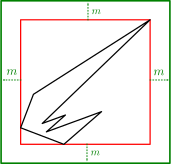
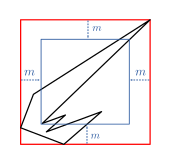
An AABB supports ray casting and point queries as well.
There are four ways to create an AABB. The main one is to use the usual
static method AABB::new(mins, maxs). This will fail if one component of
mins is strictly greater than the corresponding component of maxs. The
second one is to use the unsafe constructor AABB::new_invalid(). It is unsafe
because the result AABB is invalid: its mins field is set to
Bounded::max_value() and
its maxs field is set to
-Bounded::max_value().
This is useful to initiate the merging of multiple AABB. The third construction
method is to use the bounding_volume.aabb(g, m) function, where g and m
are the shape and its position (e.g. a transformation matrix). Finally, generic
applications may directly call the method from the HasBoundingVolume trait.
The following example computes the AABB of two balls, merges them together, creates an enlarged version of the second one, and performs some tests.
- Example 2D
- Example 3D